
Service Advisor Instant-Offer Workflow for Dealerships
TL;DR
- AVA flags acquisition-worthy service vehicles before or at check-in, giving advisors a defined opportunity during write-up.
- The service advisor presents an iOffer-based instant offer and records whether the customer accepts, declines, or remains undecided. The advisor does not perform the appraisal.
- AutoAcquire logs the response against the service repair order. AVA manages approved follow-up, while the used car manager owns the purchase handoff and tracks progress in the VRM Dashboard.
- AutoAcquire operates alongside the dealership DMS, write-up tools, and appraisal systems. It does not replace them.
- Launch requires DMS integration and advisor training. The DMS integration guide covers the required planning.
How the instant-offer workflow runs from check-in to acquisition
AutoAcquire adds a vehicle acquisition workflow to the dealership’s existing service write-up process. The DMS remains the system of record for the repair order, while AutoAcquire manages the opportunity from target identification through the purchase handoff.
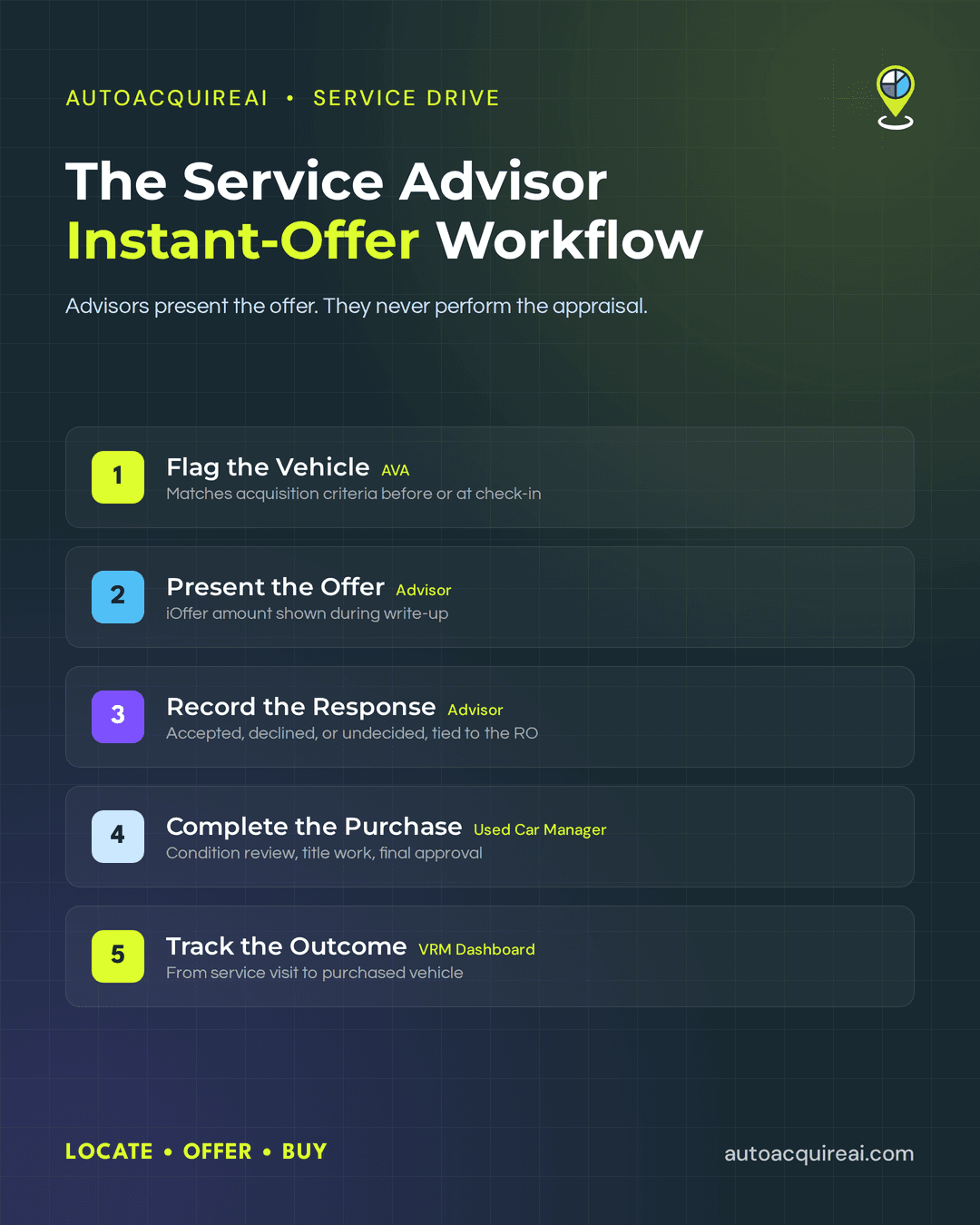
- AVA identifies the opportunity. The configured integration provides the vehicle and appointment data available under the dealership’s permissions. AVA flags vehicles that match the store’s acquisition criteria before or during check-in.
- The advisor presents the offer. iOffer displays an offer tied to the flagged vehicle. The advisor introduces the offer during write-up but does not calculate the vehicle’s value.
- The advisor records the response. Accepted, declined, or undecided responses stay connected to the vehicle and service visit. Accepted opportunities move to the used car manager or buyer, and AVA can handle approved follow-up for undecided customers.
- The acquisition team completes its review. The used car manager or buyer owns final approval, condition review, title work, purchase documents, and the vehicle handoff. Remote Inspection can collect more condition information when the service-lane review is not enough.
- The VRM Dashboard tracks the outcome. Acquisition staff monitor open opportunities and completed purchases. Final inventory entry follows the dealership’s configured DMS process and may remain a manual step.
Workflow asset required
Add a diagram showing the verified data flow among the DMS, service write-up system, and AutoAcquire. Label automated transfers, advisor actions, acquisition-team handoffs, optional Remote Inspection, and manual DMS entry.
Identifying valuable incoming vehicles before write-up
AutoAcquire screens incoming vehicles for service drive acquisition and flags candidates before or during check-in. AVA automates target identification and presents the matched VIN for review. The service advisor confirms the vehicle and customer during write-up rather than searching the appointment list manually.
Advisor judgment starts after AutoAcquire identifies the opportunity. The advisor confirms that the flagged vehicle is present and suitable for an offer conversation. The advisor does not perform an appraisal or estimate wholesale value at this stage.
AutoAcquire materials supplied for this page do not specify which targeting signals the platform weighs. Claims involving equity, mileage, model year, service history, inventory demand, or dealership-defined thresholds require product confirmation.
SCREENSHOT PLACEHOLDER
Show the target identification view with the flagged VIN, customer or appointment reference, acquisition status, and the alert visible to the advisor.
PRODUCTION NOTE
Add the verified targeting fields, scoring rules, refresh timing, and source system for each field. The final image should also show whether fixed operations or used-car management can adjust selection criteria.
Presenting the offer during write-up
During write-up, AutoAcquire turns a flagged vehicle into a specific service-drive acquisition conversation. iOffer calculates and displays the instant cash offer tied to the vehicle. The service advisor presents that amount without pricing the vehicle or performing a manual appraisal at the counter.
The advisor can use a direct prompt such as, “The dealership is interested in purchasing your vehicle. Here is the current offer.” The displayed amount gives the customer a concrete number to consider rather than a general request for an appraisal. The advisor still owns the conversation and answers basic process questions.
An interested customer moves to the used car manager or designated buyer for condition review, final approval, and purchase steps. Remote Inspection can support condition verification when the dealership needs more information. The advisor does not own valuation decisions, offer adjustments, title review, or purchase paperwork.
AutoAcquire automates the offer calculation and advisor-facing display. The dealership DMS continues to handle service write-up, while AutoAcquire operates as the vehicle acquisition layer beside it. Any final appraisal requirements, approval rules, or manual data entry depend on the dealership’s configured workflow.
Screenshot required
Show the advisor-facing iOffer screen during write-up. The image should include the vehicle identifier, offer amount, advisor action, and any visible status or expiration language.
Production note
Confirm the exact screen fields, valuation inputs, offer conditions, expiration rules, and DMS launch behavior against the production product. Do not imply that every offer bypasses buyer approval or condition verification unless product documentation supports that claim.
Capturing the customer response and routing follow-up
The service advisor records the customer’s response during write-up as accepted, declined, or undecided. AutoAcquire ties that response to the vehicle and service visit, giving the acquisition staff a visible record instead of leaving the outcome in advisor notes.
An accepted offer moves to the used car manager or designated buyer for purchase, condition review, and paperwork. A declined offer remains logged for service-drive attribution and reporting. The advisor owns the counter conversation and response entry. Acquisition staff own the accepted-customer handoff.
AVA handles follow-up when the customer remains undecided. The platform runs dealership-approved outreach sequences rather than requiring the advisor or BDC to track each opportunity manually. Dealers can review the broader service-drive acquisition workflow for context on AVA’s role.
Screenshot placeholder
Advisor response-capture interface showing accepted, declined, and undecided options plus the vehicle and service-visit record.
Production note
Confirm the available follow-up channels, cadence controls, opt-out handling, decline routing, and user permissions before publication.
Tracking the vehicle through acquisition and into inventory
An accepted offer moves into a dealer-owned purchase workflow within AutoAcquire’s service-drive acquisition process. The service advisor records the customer’s response and hands the opportunity to the used car manager or assigned buyer. The advisor does not own appraisal approval, purchase paperwork, or inventory entry.
The used car manager reviews the acquisition opportunity and authorizes the next step. When condition requires further verification, the buyer can request a Remote Inspection before finalizing the purchase. The buyer then confirms the vehicle details, coordinates title and purchase paperwork, and records progress in the VRM Dashboard.
The VRM Dashboard gives fixed operations and used car management a shared view of the vehicle after the service-drive handoff. AutoAcquire serves as the acquisition execution layer, while the DMS remains the dealership’s primary system for repair orders and inventory records. Dealer staff may need to complete final inventory creation or other DMS entry manually, depending on the approved integration configuration.
[SCREENSHOT PLACEHOLDER. VRM Dashboard showing the service repair order, customer response, assigned owner, and acquisition status.]
Production note
Confirm the available VRM status fields, role permissions, title-document handling, DMS write-back behavior, and closed-acquisition attribution before publication. The final page should distinguish automated status updates from steps that require buyer or accounting input.
Where AVA, iOffer, Remote Inspection, and the VRM Dashboard fit together
AutoAcquire connects four components around the service advisor workflow. Each component handles a separate stage of dealership vehicle acquisition.
- AVA identifies service-drive acquisition opportunities and automates approved outreach and follow-up. Advisors still handle the in-person conversation during service write-up.
- iOffer supplies the instant cash offer presented to the customer. The advisor communicates the offer and records the customer’s response without performing a separate appraisal.
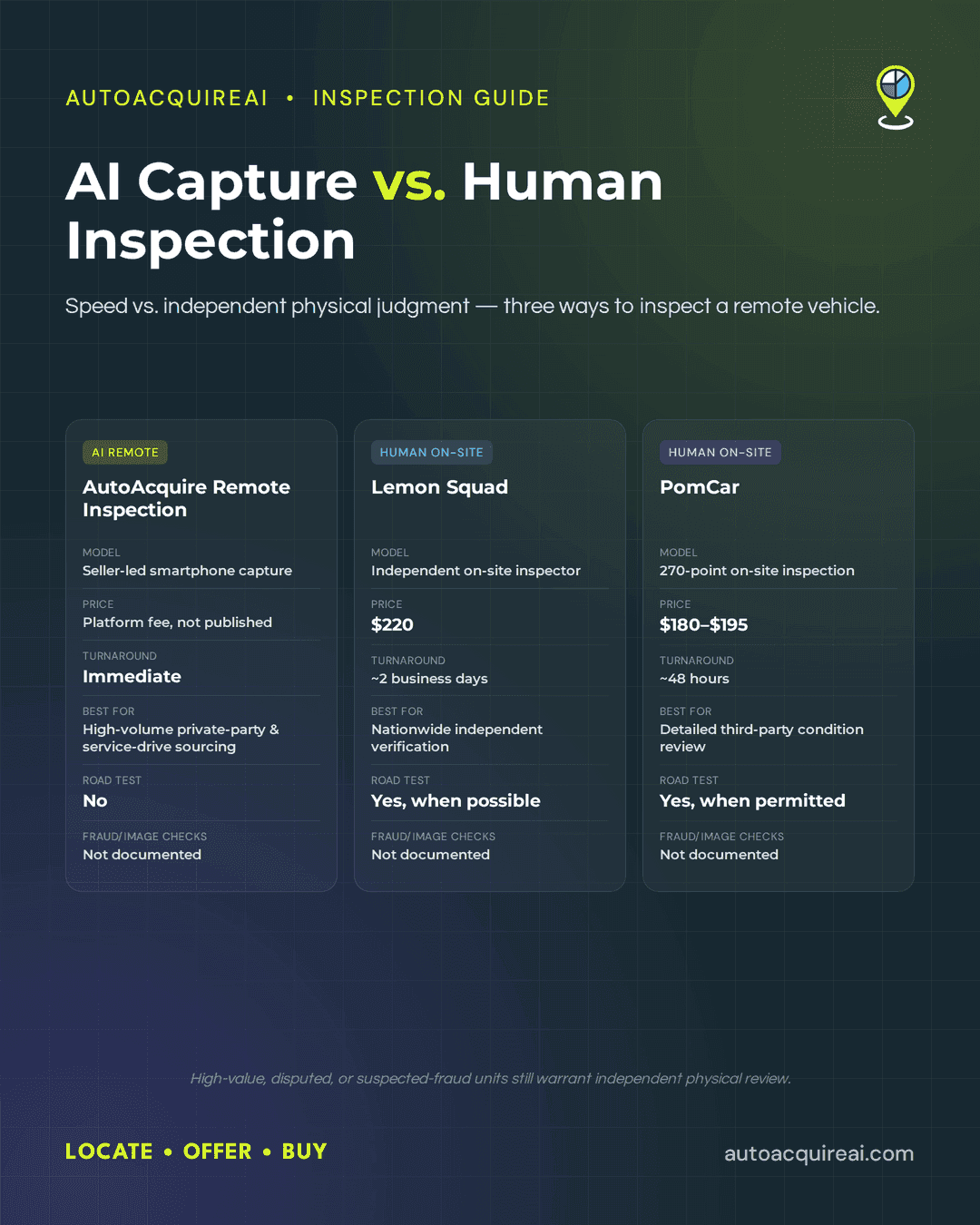
- Remote Inspection supports vehicles that need condition verification beyond what staff can observe at check-in. Its AI-guided, self-service condition report gives acquisition staff more information before they finalize the purchase.
- VRM Dashboard gives used car managers and buyers a shared view of acquisition activity. Staff can monitor opportunities as they move through offer, response, follow-up, and purchase stages.
The four products form an acquisition execution layer around the dealership’s existing systems. AutoAcquire does not replace the DMS, service write-up tools, or inventory management software. Dealers continue using those systems for their established operational functions while AutoAcquire handles seller targeting, outreach, offers, condition capture, and acquisition tracking.
Configured DMS access determines which vehicle, customer, and service data can support the workflow. The DMS integration guide covers the integration questions dealerships should resolve for their specific environment. The broader service-drive acquisition overview explains how the connected workflow supports direct sourcing through fixed operations.
Editorial callout
Add a workflow diagram showing AVA, iOffer, Remote Inspection, and the VRM Dashboard alongside the DMS, service write-up system, and inventory platform. The diagram should label automated steps, advisor actions, acquisition-team handoffs, and any manual data entry.
Implementation, DMS dependencies, and advisor training
AutoAcquire requires DMS access, role permissions, and advisor training before the service drive acquisition workflow can go live. The platform complements the DMS by adding target identification, instant offers, customer response capture, and acquisition tracking. Advisors continue using the dealership’s existing service write-up process.
AutoAcquire supports CDK, Reynolds, and Dealertrack integrations. However, the available product information does not define which fields each connector reads or writes, how often records sync, or whether every connector supports the same functions. The implementation plan must identify how appointments, repair orders, customer records, VINs, offer responses, and acquisition statuses move between AutoAcquire and the DMS. The DMS integration guide explains the integration questions dealership technology buyers should resolve.
The fixed operations director should assign DMS access and approve where acquisition prompts appear during write-up. The used car manager should set targeting and escalation rules. AutoAcquire or the dealership technology administrator should configure the connection and test record matching. Access should follow role boundaries so advisors can present offers and capture responses without receiving administrative permissions.
Advisor training should use actual write-up scenarios rather than a general product tour. Each advisor needs to recognize a flagged vehicle, open the iOffer experience, explain the offer, record the customer’s response, and route an interested customer to the used car manager or buyer. Advisors do not replace the appraisal or purchasing staff. They introduce the offer and document the response.
Manual work remains part of the workflow. The advisor conducts the customer conversation, dealership staff handle the acquisition handoff, and the appropriate dealership roles complete title and purchase paperwork. Remote Inspection may collect additional condition information, but it does not remove dealership approval or documentation requirements.
AutoAcquire has not supplied a verified standard onboarding duration or connector-specific training schedule for publication. A credible implementation timeline should name dates for DMS authorization, field mapping, user provisioning, workflow testing, advisor training, and launch support.
Production note
Add verified connector documentation for CDK, Reynolds, and Dealertrack. Include a concrete implementation timeline and specify read access, write-back behavior, sync frequency, required permissions, and manual fields for each connector.
Reporting and acquisition attribution
AutoAcquire attributes each acquired vehicle to its originating service-drive opportunity by retaining the VIN, service RO, rooftop, customer response, and acquisition status in the VRM Dashboard. The used car manager can trace the vehicle back to the advisor interaction instead of treating it as an unattributed inventory purchase.
Multi-rooftop reporting groups acquisition activity by store while giving authorized group users a rolled-up view. Store and group permissions determine which records each user can access. AutoAcquire serves as the acquisition execution layer, while the DMS remains the record for service and inventory operations. The DMS integration guide covers the broader data relationship.
Reporting should let fixed operations directors compare flagged opportunities, presented offers, customer responses, and completed purchases by rooftop. Used car managers can use vehicle-level records to review open handoffs and confirm which service-drive conversations produced acquired inventory.
Screenshot placeholder
VRM Dashboard acquisition reporting view with VIN-level status, originating service RO, advisor, acquisition source, and per-rooftop breakdown.
Production note
Confirm the available group rollups, export options, permission levels, DMS write-back behavior, and attribution fields against current product documentation. Add verified integration documentation before publication.
Customer proof placeholder
Add one named dealership result or a narrowly defined operational metric with its measurement period. Do not publish claims about acquisition volume, advisor adoption, or completion speed without supporting evidence.
FAQ
- How does AutoAcquire select vehicles for an offer? AVA flags service-drive vehicles that match the dealership’s acquisition criteria. Dealers can review the broader service-drive acquisition workflow, but the exact data fields and scoring rules should appear in the final product documentation.
- Do service advisors perform appraisals? No. iOffer generates the offer, while the advisor confirms the opportunity and discusses it with the customer. Remote Inspection can collect additional condition information when the vehicle needs more review.
- How does the offer appear during write-up? The advisor receives the iOffer amount within the service advisor workflow and presents it during the customer conversation. The dealership’s DMS remains the write-up system.
- How does a customer accept or decline? The advisor records the customer’s response during write-up. An interested customer moves to the used car manager or buyer for purchase terms and paperwork.
- Who follows up with undecided customers? AVA can run approved outreach sequences for customers who do not decide at the counter. Dealership staff still own exceptions, negotiations, and final purchase approval.
- How do CDK, Reynolds, and Dealertrack integrations work? AutoAcquire supports those DMS platforms and offers an open API. Connector permissions, synchronized fields, write-back behavior, and manual steps depend on the implementation described in the DMS integration guide.
- Can multi-rooftop groups view combined reporting? The supplied product record does not establish the exact roll-up controls, rooftop filters, or user permissions. Final product documentation should show the VRM Dashboard reporting view and define group-level access.
- How are purchases attributed to the service drive? The intended workflow associates the acquisition opportunity with the service visit and vehicle record. Final integration documentation should specify whether the repair order number passes automatically or requires manual entry.
Production note. Publication requires verified screenshots for targeting, offer presentation, response capture, and reporting. Add connector documentation, a workflow diagram, an implementation timeline, and named customer evidence before publishing operational claims.
Getting started with the instant-offer workflow
AutoAcquire fits dealerships that want service advisors to introduce instant offers during write-up while used car managers control the purchase handoff. The vehicle acquisition software complements the DMS and preserves existing service operations. Dealerships seeking to replace their DMS, inventory platform, or appraisal process should look elsewhere.
The operating decision is whether the dealership wants acquisition activity built into the service lane. If so, the fixed operations director and used car manager can schedule an implementation conversation covering DMS access, advisor permissions, role ownership, and the first rooftop. The service drive acquisition guide provides broader category context.