
TL;DR
- A remote vehicle inspection lets a seller document vehicle identity and condition without visiting the dealership. AI-guided capture prompts the seller for required photos, videos, and close-ups.
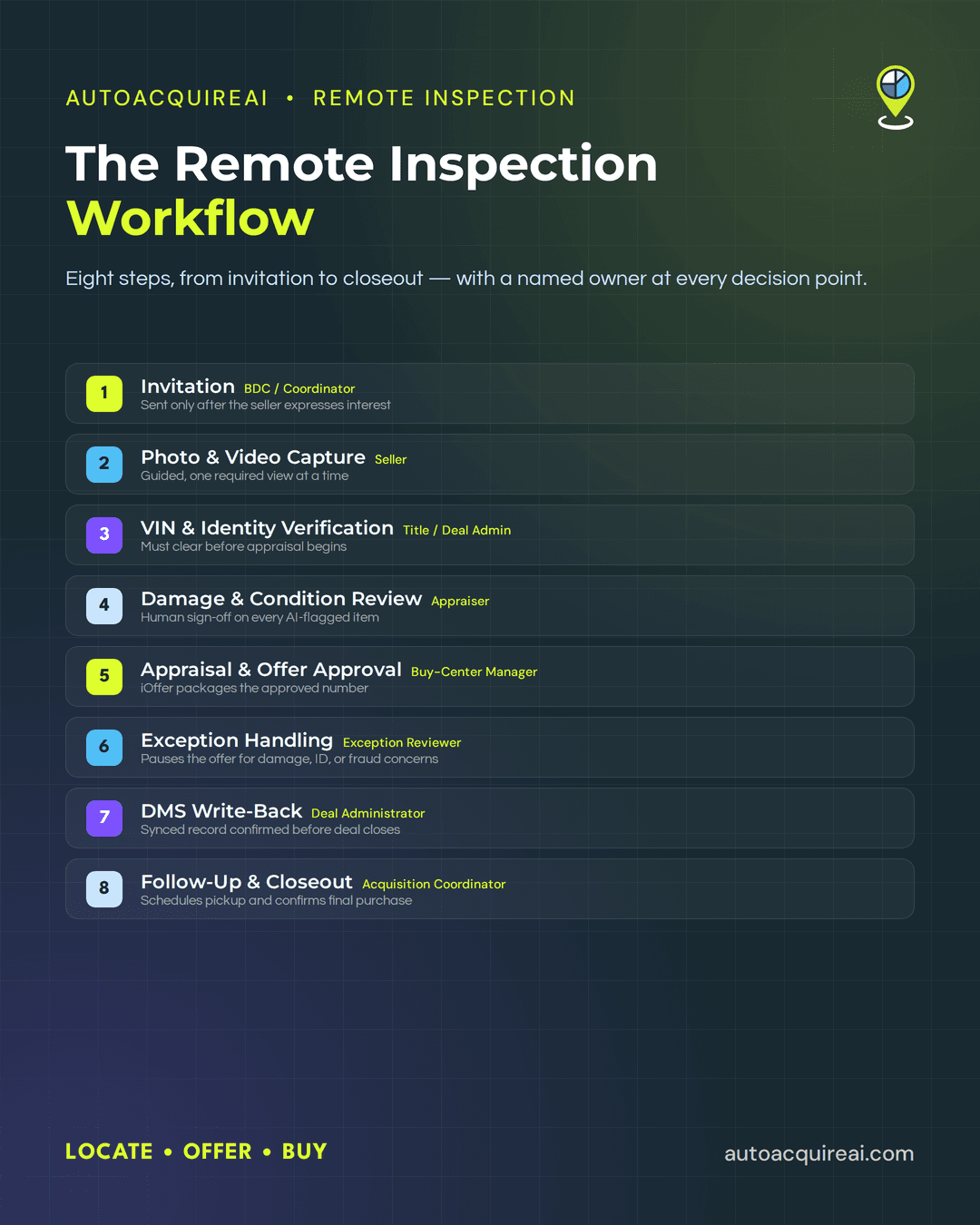
- The sequence runs invite → capture → verify → review → offer → exception handling → DMS write-back → follow-up.
- BDC staff own invitations and follow-up. Sellers complete capture, appraisers control pricing, and designated reviewers handle exceptions.
- AutoAcquire connects Remote Inspection with AVA outreach and iOffer inside the acquisition workflow.
- Dealership staff retain authority over appraisals, exceptions, and final purchases. Staff should require a physical or specialist inspection when remote media cannot resolve mechanical, structural, identity, or documentation concerns.
Where remote inspection fits in the acquisition workflow
A remote vehicle inspection lets a seller document a vehicle’s identity and condition without bringing it to the dealership first. AI-guided capture presents each required photo or video prompt in sequence and flags missing or unusable submissions for another attempt.
Dealers can start the inspection through two acquisition paths. AVA can contact service-drive customers or private-party owners and send an inspection request after the seller expresses interest. A seller can also initiate a request directly through a dealership’s approved acquisition channel. Both paths should create the same inspection record and place it in one queue, with the source and prior conversation attached.
AutoAcquire connects Remote Inspection with AVA outreach and iOffer inside one acquisition workflow, while dealership staff retain authority over appraisals, exceptions, and purchases. The completed condition record moves to iOffer for staff-controlled pricing and offer approval. After acceptance and final review, the approved transaction data moves into the dealership’s DMS.
Clear ownership prevents inspection records from stalling between outreach and appraisal. BDC or outreach staff own the invitation, seller communication, and completion follow-up. The appraiser or buy-center manager reviews submitted media, adjusts the valuation, and approves the seller-facing offer. An exception reviewer handles identity conflicts, title issues, suspected fraud, unresolved damage, and cases that require physical or specialist inspection.
A dealership may combine these responsibilities at a smaller store, but each inspection still needs a named owner at every decision point. Automation can collect information and route the record. Staff decide whether the evidence supports an offer, requires escalation, or cannot support a remote purchase.
Step 1: Sending the inspection invitation
A remote vehicle inspection lets a seller document a vehicle’s identity and condition without bringing it to the dealership first. AI-guided capture gives the seller a required shot sequence and checks whether submitted media meets configured quality rules.
The invitation should go out only after the seller expresses interest in an appraisal or purchase offer. AVA outreach, a service-drive conversation, or a private-party inquiry can trigger the request. AutoAcquire Remote Inspection carries the seller into the iOffer workflow, while dealership staff retain control over appraisal and purchase decisions.
Each inspection record needs the following inputs before release.
- The record must include a VIN or a license plate with its issuing state.
- The record must include the seller’s name, mobile number, and email address when available.
- The record must identify the source channel, such as service drive, AVA outreach, or private-party inquiry.
- The record should preserve relevant AVA conversation context, including the seller’s timing, stated mileage, and known condition disclosures.
- The record must name the dealership location and staff owner.
A named BDC or buy-center coordinator owns invitation accuracy and delivery. The used car manager should define who handles failed texts, duplicate records, and missing vehicle data.
Sample seller message
Hi [Seller Name], [Dealership Name] would like to review your [Year Make Model]. Use this secure link to confirm the vehicle details and complete a guided photo and video inspection. Please have the vehicle, keys, and current odometer reading available. [Inspection Link]
Before sending, the coordinator must match the VIN or plate to the intended vehicle and confirm that the phone number belongs to the expected seller. Any mismatch stops the invitation until staff correct the record.
Step 2: Guiding the seller through photo and video capture
A remote vehicle inspection lets a seller document a vehicle’s identity and condition without bringing it to the dealership first. AI-guided capture presents one required view at a time and checks whether the submission meets configured image-quality rules before moving forward.
Dealers should configure the shot sequence before launching the workflow. A typical sequence covers each exterior panel, a full walkaround video, all four tires, the cabin, seats, cargo area, odometer, dashboard warning lights, VIN plate, and keys. The flow should request close-ups whenever the seller reports or reveals dents, scratches, glass damage, tire wear, or interior defects. Vehicle type can change the list. For example, a convertible requires roof images, while a pickup requires bed and tailgate views.
Clear prompts reduce missing or unusable media by telling the seller where to stand, what to include, and when to retry a shot. Dealers should set requirements for daylight, minimum image clarity, full-panel framing, and legible odometer and VIN photos.
Sample seller message
Please complete the guided inspection in daylight with the vehicle parked safely. Follow each prompt and keep the requested panel fully visible. Photograph any damage up close, then take a second photo that shows its location on the vehicle. The inspection usually works best with a clean camera lens and a stable internet connection.
The dealership’s QC rule should block appraisal review when a required view is missing, dark, blurred, obstructed, or inconsistent with another image. The BDC or inspection coordinator sends a targeted recapture request that names the failed shots instead of asking the seller to repeat the full inspection. After two unsuccessful attempts, staff should contact the seller or move the vehicle to an in-person inspection.
Within AutoAcquire, Remote Inspection connects an AVA outreach response with the iOffer workflow. Dealership staff still decide whether the media supports appraisal, requires another capture, or needs physical review.
Step 3: VIN and identity verification
Verification must clear before the appraiser reviews condition or releases a value. The remote vehicle inspection record needs a readable dash VIN image, decoded vehicle details, seller identification, and title or ownership data. AutoAcquire can connect that verification to the acquisition workflow, but dealership staff control every exception and approval.
The VIN shown in the submitted image must match the VIN entered with the inspection request and the VIN on the title record. The decoded year, make, model, and body style must also describe the submitted vehicle. A blurred VIN image triggers a recapture request rather than an automatic failure.
| Verification result | Required action | Owner |
|---|---|---|
| VIN and decoded vehicle match | Release the record to appraisal | Inspection workflow |
| VIN image cannot be read | Request a new VIN image | BDC or outreach staff |
| Entered VIN and photographed VIN differ | Freeze the record and escalate | Exception reviewer |
| Seller name matches ID and title | Continue to appraisal | Inspection workflow |
| Name, title status, or ownership authority remains unclear | Hold the offer and review documents | Buy-center manager |
Seller identity requires more than a matching contact name. The legal name on the seller’s ID should match the titled owner, subject to staff review for minor variations such as a middle initial. A lien, business-owned vehicle, trust, estate, co-owner, rebuilt title, or missing title requires staff review because the named seller may lack authority to complete the transaction alone.
Any unresolved VIN, identity, or title mismatch blocks automated appraisal and iOffer release. Staff may request clearer documents, confirm payoff or ownership authority, or require an in-person document and vehicle inspection. The appraiser should proceed only after the exception reviewer records approval and the supporting evidence in the deal file.
Step 4: AI-assisted damage and condition review
The appraiser should treat AI output as a review queue rather than a condition verdict. AutoAcquire Remote Inspection organizes seller-submitted media and surfaces flagged panels and wear indicators alongside a mileage cross-check. The appraiser uses those prompts to decide which images or video segments need closer review.
Every flagged item requires inspection of the original media. For example, a flagged door panel may show a dent, reflected light, dirt, or an angle that obscures the surface. The reviewer determines whether the media confirms damage, clears the flag, or leaves the condition unresolved.
Dealers should require a recorded human disposition for each AI-flagged item before adjusting the appraisal. Useful statuses include confirmed, dismissed, and recapture required. A confirmed item should include the affected area, condition type, severity judgment, and any appraisal deduction. A dismissed item should include a short reason so another staff member can audit the decision without repeating the full review.
The appraiser should also review the complete submission for visible conditions that received no flag. AI-guided prompts help organize the review, but staff remain responsible for the condition report and any pricing effect.
Unclear media should trigger a targeted recapture request rather than an assumed deduction. If remote capture cannot resolve possible structural damage, mechanical concerns, mileage discrepancies, or signs of altered media, the appraiser should pause the remote vehicle inspection and route the vehicle to an in-person or specialist inspection. No condition flag should change the offer until an authorized dealership reviewer signs off.
Step 5: Appraisal adjustment and instant-offer approval
The appraiser owns the firm number and must document every condition adjustment before iOffer prepares the seller-facing offer. Each deduction or addition should include the amount, supporting inspection media, adjustment category, and reviewer. AI-flagged damage cannot affect pricing until an appraiser approves the finding.
iOffer can auto-generate an offer when the vehicle clears identity and title checks, all condition items have staff sign-off, and the adjusted value remains within dealership-set pricing limits. Dealers should configure limits by factors such as vehicle age, mileage, acquisition cost, and variance from the starting appraisal.
A manual pricing override applies when the proposed amount falls outside those limits or an unresolved condition could change the vehicle’s value. Unusual equipment, uncertain repair scope, conflicting mileage, or stale valuation data also require manual review. The appraiser must enter the revised amount and record the reason for the override.
Auto-generation should prepare the offer for approval rather than release it automatically. The used car director or designated buy-center manager holds final sign-off authority. Dealers may delegate approval within documented dollar limits, but offers above those limits return to the named final approver.
Before release, iOffer should present the approved amount, expiration time, vehicle assumptions, seller requirements, and next step. Any condition tied to final title review or physical verification should appear in the offer rather than in an internal note. Remote Inspection supplies the reviewed condition record, while iOffer packages the approved number for the seller. Dealership staff retain control over the appraisal and release decision.
Step 6: Exception handling and escalation
Remote inspection exceptions should stop the offer workflow before uncertain information affects the appraisal. The buy-center manager owns the escalation queue and assigns each case to an appraiser, title specialist, or physical inspector.
| Exception scenario | Required action | Owner |
|---|---|---|
| Media shows possible structural damage, frame repair, flood exposure, or deployed airbags | Pause the offer and require an in-person or specialist inspection. Release a revised offer only after staff review the findings. | Senior appraiser or designated inspection partner |
| Odometer, VIN, seller identity, or title records do not match | Block appraisal approval and compare the submitted documents with dealership records. Refer title issues to qualified dealership staff. | Title specialist, with buy-center manager oversight |
| The seller submits incomplete or unusable media after two capture requests | Contact the seller once for assisted capture. Schedule an in-person inspection if the missing views could change value or vehicle eligibility. | BDC or acquisition coordinator |
| Photos appear staged, reused, altered, or inconsistent with the vehicle record | Suspend the remote vehicle inspection and request live capture plus identity verification. Decline the remote transaction if staff cannot verify the vehicle or seller. | Fraud or compliance reviewer, with manager approval |
Dealers should set a response target for every flagged case. Buy-center staff should acknowledge exceptions during the same business period, assign an owner immediately, and update the seller within one business day. Title, identity, and suspected fraud issues should remain blocked until staff resolve them.
Staff can return a case to remote review when new media or documents answer the specific concern. Dealers should move the vehicle to in-person review when condition uncertainty could materially change the appraisal. Mechanical symptoms, possible structural damage, unclear ownership, and documentation conflicts often require physical or specialist inspection.
The buy-center manager should decline the remote deal when the seller refuses verification, repeated capture attempts fail, or available evidence cannot establish a defensible vehicle and ownership record. Staff should record the exception reason, supporting media, reviewer, and final decision before closing the case.
Step 7: DMS write-back and record sync
An accepted offer should trigger DMS write-back promptly, while the record remains pending until funding, title transfer, and vehicle receipt are complete. Delayed sync can leave inventory staff working from stale acquisition data and create discrepancies between purchase documents and accounting records.
The write-back package should include the information needed to identify, value, and document the vehicle.
- The vehicle record should include the VIN, mileage, seller details, and acquisition source.
- The appraisal record should include the condition report, approved offer amount, adjustments, and staff approval.
- The deal file should include inspection media and available purchase documents.
AutoAcquire integrates with CDK, Reynolds, and Dealertrack. Before launch, dealers should map each incoming field to the correct DMS location and test how the DMS handles attachments, duplicate VINs, rejected records, and interrupted transfers.
A designated acquisition coordinator should confirm that the VIN, offer amount, condition report, media, and purchase documents reached the correct record. The coordinator should also compare the DMS status with the acquisition workflow status. Staff should not mark the deal closed until that check passes. Failed or partial write-backs should enter a reconciliation queue with an assigned owner rather than relying on manual follow-up.
Step 8: Final staff follow-up and deal closeout
The acquisition coordinator should confirm the handoff method before treating an accepted offer as a completed purchase. The coordinator schedules dealership pickup, seller drop-off, or in-store completion and records the appointment in the acquisition workflow. Staff should route any unresolved mechanical, structural, identity, or documentation concern to a physical or specialist inspection before funding.
Sample seller message
“Your vehicle purchase appointment is scheduled for [date and time] at [location]. Please bring the title, government-issued ID, all keys, and any lien or payoff information. The dealership will confirm the vehicle details, complete the purchase documents, and explain payment timing at the appointment. Reply here if the vehicle’s condition or ownership status has changed.”
Closeout checklist
- The acquisition coordinator confirms the appointment, location, seller contact, and transportation plan.
- The receiving employee checks the VIN, odometer, keys, accessories, and current condition against the remote vehicle inspection record.
- The title clerk matches the seller’s identification with the title and resolves lien, payoff, or co-owner requirements.
- The authorized appraiser reviews any material condition change and approves, revises, or withdraws the offer.
- The finance or accounting employee releases payment only after required documents and approvals are complete.
- The record owner confirms signed documents, vehicle custody, final status, and DMS write-back.
AutoAcquire can carry the accepted offer into closeout, but dealership staff retain final authority over appraisal changes, funding, and the purchase decision.
Staffing model and role ownership
Each workflow step needs one accountable owner and a named backup before launch. Dealers can combine roles at smaller stores, but escalation authority must remain clear.
| Step | Primary Owner | Backup/Escalation Owner |
|---|---|---|
| 1. Inspection invitation | BDC or acquisition coordinator | Buy-center manager |
| 2. Seller capture support | Acquisition coordinator | BDC manager |
| 3. VIN and identity verification | Title or deal administrator | Compliance manager |
| 4. Damage and condition review | Appraiser | Used car director |
| 5. Appraisal and offer approval | Buy-center manager | Used car director or dealer principal |
| 6. Exception handling | Designated exception reviewer | Used car director or outside specialist |
| 7. DMS write-back | Deal administrator | DMS administrator or controller |
| 8. Follow-up and closeout | Acquisition coordinator | Title and accounting staff |
AutoAcquire can use AVA to run approved outreach and follow-up cadences for service-drive customers and private sellers. A BDC manager should own message templates, contact limits, and handoff rules rather than reviewing every routine contact.
Human staff retain decision authority after outreach. Title staff resolve identity and ownership concerns. Appraisers sign off on condition findings and pricing changes. The used car director handles exceptions, approves offers outside preset guardrails, and decides when a physical or specialist inspection is required. Deal administration confirms DMS sync, while title and accounting staff control documentation and funding before final purchase approval.
Rollout phases for launching remote inspection
Dealers should launch remote vehicle inspection in three phases and advance only when operating KPIs meet preapproved thresholds. Before the pilot, the used car director should set targets for completion, capture re-requests, exceptions, offer acceptance, and DMS write-back time.
| Phase | Scope | Operating focus | Gate to advance |
|---|---|---|---|
| 1. Service-drive pilot | One rooftop and a limited set of service-drive acquisition candidates | Test AVA invitations, seller instructions, staff review, iOffer approval, exception routing, and DMS write-back | Completion and offer rates meet targets. Re-request and exception rates remain within limits. Staff complete DMS write-back within the required timeframe. |
| 2. Private-party expansion | Add private sellers within a defined market or acquisition radius | Test identity and title checks, after-hours submissions, seller follow-up, and unresolved-condition escalation | Private-party results meet the same quality thresholds without creating an exception backlog or slowing appraisal review. |
| 3. Multi-rooftop scale | Add rooftops in controlled groups | Standardize permissions, appraisal guardrails, messaging, escalation ownership, and reporting across stores | Each rooftop meets KPI thresholds for an agreed review period, and group leaders can identify ownership for every open exception. |
Phase one should use vehicles with accessible dealership records and staff who can contact the seller quickly. Service-drive records provide a controlled starting point for testing whether AVA outreach, Remote Inspection, and iOffer move a vehicle through one acquisition workflow without losing staff oversight.
Phase two adds greater identity, documentation, and response-time variation. Dealers should pause expansion when private-party submissions increase unresolved title issues, repeated capture requests, or appraisal delays beyond the approved limits.
Multi-rooftop deployment should begin with a small store group rather than every location at once. Each rooftop needs a named workflow owner, local appraisal authority, and backup exception reviewer. Dealers should roll back or hold a phase when KPI performance falls outside its threshold, then correct the workflow before adding volume.
KPIs and quality-control benchmarks to track
Set KPI thresholds during the pilot, then review them by source channel and rooftop. A missed threshold should trigger workflow review rather than an automatic judgment about AI vehicle inspection accuracy.
- Invitation-to-completion rate divides completed inspections by delivered invitations. A decline should prompt a review of seller messaging, link delivery, and capture length.
- Capture re-request rate tracks submissions that require new photos or video. When the rate exceeds the pilot threshold, managers should inspect which prompts produce missing, dark, blurred, or poorly framed media.
- Offer-to-acceptance rate divides accepted offers by released offers. Managers should review results alongside appraisal overrides and seller source because weak pricing and low-intent outreach can produce the same decline.
- Exception rate measures inspections routed to manual, physical, or specialist review. Managers should classify exceptions by cause so identity mismatches remain separate from unresolved condition concerns.
- Time-to-DMS-write-back measures the interval between offer acceptance and confirmed record creation. Track the median and slowest cases. Delays above the dealership threshold should trigger an integration and queue review before staff close the deal.
Managers should also audit a fixed sample of completed files each week. Each audit should confirm that the VIN matches, required media appears, staff approved condition adjustments, and the DMS received the final record. Repeated failures should pause expansion until the dealership corrects the prompt, role assignment, or integration causing them.
Launch checklist
Data readiness
- Confirm every inspection request includes the VIN or plate and state, seller contact details, source channel, and relevant AVA conversation history.
- Load appraisal guardrails, store information, user permissions, and required seller consent fields.
- Define the documents required to verify seller identity, ownership, mileage, and title status.
Seller messaging templates
- Approve invitation, capture reminder, recapture, offer, appointment, and decline messages.
- Test every link and message on common mobile devices.
- Give sellers clear instructions for lighting, camera angles, odometer images, and damage close-ups.
Staff role assignment
- Assign primary and backup owners for outreach, condition review, appraisal approval, and deal closeout.
- Set user permissions so only authorized staff can adjust or release offers.
- Publish response-time expectations for new submissions, recapture requests, and accepted offers.
DMS integration test
- Run a test record through Remote Inspection, iOffer, and the connected DMS.
- Confirm the VIN, condition report, media, offer amount, and purchase documents write to the correct fields.
- Verify failed write-backs create a visible alert and remain open until staff resolve them.
Escalation path sign-off
- Obtain written approval for rules covering identity mismatches, title issues, suspected fraud, and unresolved damage.
- Name the manager authorized to require a physical or specialist inspection.
- Define when staff pause an offer, request another capture, move the vehicle to in-person review, or decline the acquisition.
- Confirm every exception records an owner, decision, reason, and timestamp.
Conclusion
AutoAcquire connects Remote Inspection, AVA outreach, and iOffer within one acquisition workflow. Dealership staff still approve appraisal adjustments, resolve exceptions, and authorize every purchase.
An AI vehicle inspection should advance vehicles with clear evidence and route uncertain cases to people. When remote capture cannot resolve mechanical, structural, identity, or documentation concerns, staff should require a physical or specialist inspection before releasing a final offer. That control keeps automation useful without extending it beyond the evidence available.