
How to Switch Dealership DMS Providers: Migration Checklist, Costs, and Timeline
TL;DR
- Dealers should plan a DMS migration in months rather than weeks. Rooftop count, data quality, integration work, vendor capacity, and parallel testing determine the schedule.
- Direct costs include licensing, implementation, and hardware. Dealers should also budget for contract termination, data exports, dual systems, integration fees, staff overtime, and training.
- Contract notice periods, auto-renewal clauses, and export rights can delay a switch. Dealers should secure usable historical data and written access terms before signing.
- Weak governance can disrupt accounting, desking, service, parts, CRM, appraisal, and reporting workflows. Each dependency needs an owner, test plan, cutover threshold, and rollback procedure.
- Acquisition tools such as AutoAcquire can remain a complementary layer after migration. Pricing, contract terms, and timelines vary by vendor and rooftop count, so dealers should confirm each figure directly.
Why dealerships switch DMS providers
Dealerships may consider a DMS switch when renewal pricing rises, integrations constrain operations, an acquisition creates overlapping systems, or employees struggle with outdated interfaces and reporting. The original trigger should define the migration requirements and approval criteria.
A pricing-driven switch requires a full cost comparison before the renewal notice deadline. Dealers need to compare implementation fees, data exports, integration charges, hardware, training, and the temporary cost of running both platforms. A lower subscription price may still produce a higher first-year cost.
Integration limits require an inventory of every platform that exchanges data with the dealership DMS. Dealers should document connections to CRM, accounting, desking, appraisal, acquisition, service, and inventory tools. Written confirmation of API access, data permissions, and vendor responsibilities prevents unsupported connections from appearing during implementation.
Mergers and acquisitions create a different schedule. Dealer groups may need to consolidate systems quickly, but each rooftop can use different charts of accounts, workflows, and third-party vendors. Standardizing those dependencies before migration reduces inconsistent reporting and duplicate work after launch.
Outdated user experience or reporting can justify a switch when employees rely on spreadsheets, duplicate data entry, or manual report preparation. Dealers should document those problems before evaluating alternatives so product demonstrations test real workflows.
The realistic DMS migration timeline
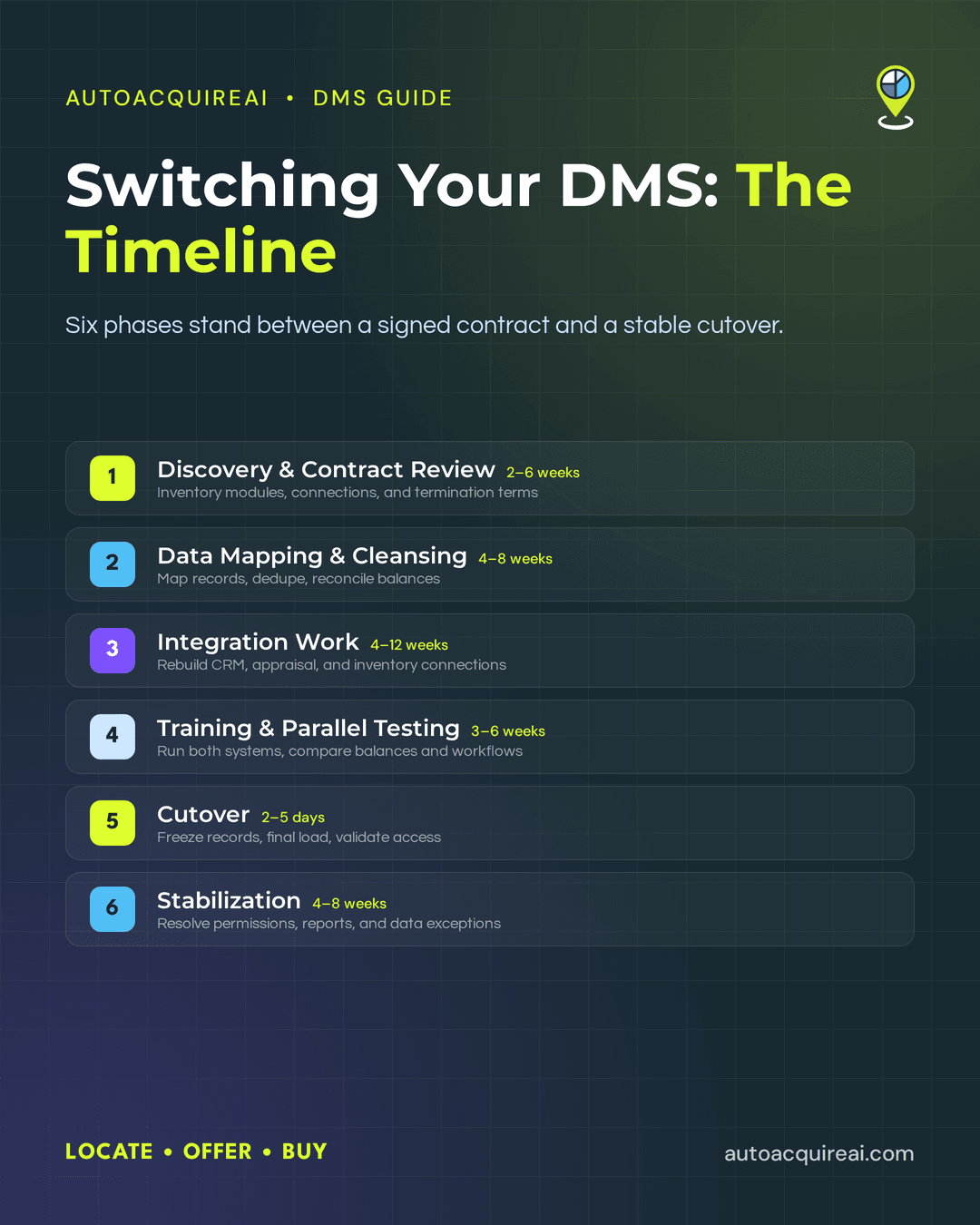
For initial planning, a single-rooftop dealership can model a four-to-nine-month migration, while a multi-rooftop group can model six to 12 months or longer. These ranges are planning assumptions rather than guaranteed industry benchmarks. Vendor backlog, data quality, integration count, and internal staffing can move those ranges. Dealers should confirm implementation capacity and proposed dates with each vendor before signing.
- Discovery and contract review usually take two to six weeks. The dealer’s project lead inventories current modules and third-party connections. Legal and operations staff review termination notice requirements, renewal dates, export rights, and vendor responsibilities.
- Data mapping and cleansing usually take four to eight weeks. The migration team maps customer, vehicle, parts, and accounting records into the new DMS. Staff also remove duplicates and reconcile balances before test data moves begin.
- Integration work usually takes four to 12 weeks. The new provider and third-party vendors rebuild connections for CRM, appraisal, and inventory tools. Accounting and desking dependencies can extend the schedule when vendors require separate approvals, fees, or technical work.
- Training and parallel testing usually take three to six weeks. Staff process representative deals and repair orders in both systems. Accounting teams compare balances, while department managers document missing fields and workflow errors.
- Cutover usually requires two to five days of concentrated work. The dealership freezes selected records, completes the final data load, and validates access before opening the new DMS to all users. Some accounting discrepancies may appear only after the first statement cycle or month-end close.
- Stabilization usually lasts four to eight weeks. Vendor support and internal owners resolve permissions, reports, integration failures, and data exceptions. Dealers should keep daily issue logs and assign deadlines until normal support procedures can take over.
Migration phases often overlap, so dealers should not add every range together. Data cleansing can continue while vendors configure integrations, and training can begin before final testing finishes.
Multi-rooftop migrations extend the calendar without multiplying it evenly by store count. Shared integration work and standardized templates can serve several rooftops, but different charts of accounts and operating practices require local validation. A staggered rollout lets one store serve as the pilot. Later stores can launch in planned waves after the group fixes problems found during the pilot, which lowers business-continuity risk while extending the overall schedule.
What a DMS migration really costs
A usable DMS migration budget separates quoted implementation costs from expenses created by exiting the current platform. Dealers should compare total costs across the proposed contract term rather than relying on the first-year quote. Multi-rooftop groups should model each store separately because hardware, training, and integration requirements may differ by location.
Direct costs
- New licensing fees cover the selected modules, users, rooftops, data storage, and support level. Dealers should identify which features require separate subscriptions.
- Implementation and setup fees may cover configuration, data imports, project management, and initial training. The proposal should state exactly which migration work the vendor includes.
- Hardware costs can include workstations, scanners, printers, payment devices, and network upgrades. A compatibility review determines which existing equipment can remain in service.
- Professional services may include custom reports, accounting configuration, and specialized data conversion. Dealers should separate required services from optional consulting.
Hidden costs
- Early termination penalties can change the economics of switching before the current contract expires. Auto-renewal and notice requirements can create another contract term if the dealership misses a deadline.
- Dual-running fees apply when the dealership operates both systems during testing. The overlap may include two subscriptions, support plans, and integration charges.
- Data export costs may cover extraction, formatting, media delivery, or continued read-only access to historical records.
- Staff overtime and backfill often increase during data cleanup, training, reconciliation, and cutover. Accounting and operations employees may need protected project time.
- Third-party integration fees can recur when CRM, desking, appraisal, payroll, website, or reporting vendors reconnect to the new DMS. Some providers charge setup, certification, or API access fees.
- Temporary productivity losses may follow go-live while employees learn new screens and resolve data discrepancies. A contingency budget can cover additional support and delayed transaction processing.
Public DMS pricing rarely follows a standardized structure. Dealers should verify every licensing, implementation, termination, export, hardware, and integration figure against current contracts and written vendor quotes before approving the migration budget.
Contract termination, renewal, and data-export risk
Contract terms can block a planned DMS cutover before technical work begins. Dealership legal and procurement staff should review the master agreement, later amendments, and order forms before selecting a go-live date. The review should identify the current term, renewal date, required notice period, and approved method for delivering notice.
Auto-renewal clauses deserve immediate attention because missing a notice deadline may extend the existing agreement. Some contracts require written notice months before renewal and specify who must receive it. Dealers should obtain written confirmation that the vendor received and accepted the termination notice.
Early termination costs can change the economics of a switch. The current provider may require payment of remaining subscription charges or previously discounted fees. Data extraction, deconversion support, archive access, and continued operation during parallel testing may create separate charges. Procurement staff should request an itemized exit estimate rather than rely on the recurring price shown on an invoice.
Data ownership does not guarantee a complete or usable export. A contract may recognize the dealership’s ownership of its records while limiting export formats, timing, or access after termination. Dealers should confirm in writing which records the vendor will provide. The scope should cover accounting and customer records, vehicle and service history, deal documents, and user audit logs where required.
The export agreement should also define the file format, delivery schedule, extraction fees, and party responsible for validating the files. Dealers need enough time to test whether the new DMS can import each dataset before the previous vendor disables production access. Any historical records that cannot move should remain available through a priced, read-only archive with a stated retention period.
Dealers should not sign a replacement DMS contract until both vendors accept a written exit and transfer plan. Contract terms vary by provider, rooftop, and negotiated deal. Legal counsel should review the dealership’s current language and proposed agreement rather than applying assumptions about CDK Global, Reynolds and Reynolds, Dealertrack, Tekion, or any other provider.
Comparing CDK, Reynolds and Reynolds, Dealertrack, and Tekion for migration
Migration risk depends more on the dealership’s existing dependencies than on a vendor’s feature list. A store using one provider for accounting, desking, F&I, service, and parts faces a larger conversion than a store replacing a limited set of modules. Dealer groups also need written answers on contract terms, data exports, API access, implementation duties, and support coverage before selecting a platform.
| Vendor | Contract/Renewal Notes | API & Export Access | Multi-Rooftop Fit | Migration Considerations |
|---|---|---|---|---|
| CDK Global | Contract length, renewal notice, termination fees, and product-level cancellation rights depend on the negotiated agreement. Dealers should review whether connected modules share one termination date. | Dealers evaluating CDK should verify which third-party connections are approved and what permissions or vendor participation each connection requires. Specify export formats, historical depth, delivery timing, and fees in writing. | Dealer groups evaluating CDK should document the configurations and third-party connections used by each rooftop. Central governance helps prevent stores from rebuilding integrations separately. | Accounting, desking, parts, service, and OEM feeds may depend closely on CDK records. Map every module and interface before deciding whether to cut over stores together or in stages. |
| Reynolds and Reynolds | Dealers need to inspect renewal windows, notice requirements, hardware obligations, and bundled product terms. Do not assume one module can be removed without affecting another agreement. | Dealers should request a written inventory of available interfaces and export methods. The migration plan should identify which records arrive as structured data and which require archive access or custom extraction. | Dealer groups evaluating Reynolds and Reynolds should decide early whether to standardize charts of accounts and shared customer rules across stores. Rooftop-specific processes can complicate a common template. | Deep accounting, desking, service, and document dependencies can expand testing. Dealers should test converted balances, repair orders, deal records, and user permissions before go-live. |
| Dealertrack | Contract terms can differ across DMS products and connected Cox Automotive services. Review each order form for renewal dates, cancellation rights, and implementation charges. | Dealers evaluating Dealertrack should not assume that a current third-party connection will transfer automatically during migration. Confirm interface approval, credentials, data fields, and recurring fees with each provider. | Dealer groups should ask Dealertrack which configurations can be shared and which controls remain specific to each rooftop. A phased rollout can expose configuration problems before they spread across the group. | Dealers should map dependencies between the DMS, CRM, digital retail, registration, lending, and F&I tools. Separate vendors may own different parts of an integration issue. |
| Tekion | Tekion agreements require the same review of term length, renewal language, implementation scope, and exit assistance. Cloud delivery does not remove contractual switching costs. | Dealers evaluating Tekion should obtain written confirmation of API scope, export rights, rate limits, and historical-data delivery. | Dealer groups should ask Tekion how its platform applies shared standards across rooftops. Groups still need decisions on permissions, accounting structures, and rollout sequencing by rooftop. | Moving to a unified platform may replace several existing interfaces and operating steps. Dealers should budget for process redesign, role-based training, data validation, and contingency access to the former DMS. |
Dealers should require parallel testing and rollback planning regardless of which provider they select. A dealership with long-standing CDK Global or Reynolds and Reynolds dependencies may need extensive departmental testing. A Dealertrack migration may require coordination among connected vendors, while a Tekion migration may involve workflow changes if the dealership replaces separate tools with shared cloud processes.
Pricing, contract terms, export rights, and implementation timelines vary by agreement and rooftop count. Dealers should require each vendor to attach responsibilities, fees, data specifications, acceptance tests, and support commitments to the final contract.
Integration inventory: what has to be remapped
Build the integration inventory by tracing every data exchange into and out of the current DMS. A software list alone will miss scheduled files, manual uploads, custom reports, and one-way feeds that staff rely on.
Catalog these connection categories.
- CRM connections may exchange customer records, leads, activities, appointments, and sold status. Record which platform owns each field and whether updates flow in both directions.
- Desking and F&I tools may depend on vehicle pricing, customer data, deal structures, credit applications, lender submissions, and finalized contracts. Identify any data that staff re-enter manually.
- Accounting systems may receive deal postings, repair-order transactions, parts sales, payroll entries, and journal data. Map every account code and posting rule rather than assuming the new DMS uses the same structure.
- Appraisal and acquisition tools may exchange VIN data, valuation inputs, offer status, purchase details, and inventory records. Record when an acquired vehicle enters the DMS and which platform controls subsequent updates.
- OEM reporting feeds may send sales, service, warranty, incentive, and financial data. Confirm certification requirements and testing windows with each manufacturer.
- Website and inventory syndication connections may publish pricing, photos, descriptions, and availability while returning customer leads. Document update frequency because delayed sold status can leave unavailable vehicles online.
Each inventory record should name the source, destination, data fields, transfer direction, update frequency, business owner, technical owner, and failure alert. Multi-rooftop groups should also record whether each connection operates centrally or uses separate credentials and rules by store.
API access determines how much remapping can be automated. Dealers need written confirmation that the current and incoming vendors will permit data pushes, provide documentation, issue credentials, and offer sandbox access for testing. When a vendor restricts access or declines integration work, the migration plan must account for file transfers, manual rebuilding, duplicate entry, or a replacement connection.
Assign responsibility for every interface before implementation begins. The DMS vendor, third-party provider, and dealership IT lead should each have named deliverables, test dates, and acceptance criteria. An integration should not count as complete until users confirm that records arrive accurately and updates return to the correct system.
Data cleansing, validation, and historical-data access
Data cleansing before extraction reduces the chance that duplicate customers, incomplete vehicle histories, and incorrect opening balances will enter the new DMS. Migration tools may transfer source-data problems unless the dealer or vendor applies documented cleansing rules for inconsistent names, invalid VINs, obsolete customer profiles, and conflicting stock numbers.
Deduplication requires documented matching rules rather than broad automatic merging. Dealers can compare customer records using phone numbers, email addresses, physical addresses, and prior transaction links. Staff should review uncertain matches because family members and commercial accounts may share contact details. Vehicle records need consistent VIN formats, mileage fields, ownership status, and links to the correct customer, repair order, or deal.
Accounting data needs separate reconciliation before the final snapshot. The controller should close or document open periods and compare the general ledger with accounts receivable, accounts payable, vehicle inventory, parts inventory, and scheduled accounts. After import, the migration owner should compare record counts and control totals between both systems. Sample testing should trace complete deals and repair orders through every related record rather than checking only the top-level entry.
Historical access needs its own contract terms and budget. A vendor’s standard export package may focus on structured records such as customer files, vehicle records, transactions, and ledger data. Older repair orders, deal documents, attachments, audit trails, and report-ready detail may arrive in limited formats or fall outside the standard export.
Dealers should specify the required history period, file format, field definitions, attachments, delivery schedule, and extraction fees in writing. The contract should also state how long the former provider will maintain read-only access and what that access costs. If a paid archive or legacy login remains necessary, dealers should assign an owner and retention period before terminating the old DMS.
Staff training and parallel testing
Role-based training gives each department time to test the work it owns. Schedule accounting training early because the chart of accounts, posting rules, and reconciliation controls affect transactions across departments. Service staff should follow with repair orders, parts billing, and appointment workflows. Desking managers should validate deal structures before sales staff practice customer-facing tasks.
Training should use dealership records and realistic exceptions rather than generic vendor demonstrations. Each department needs a designated lead who can confirm user permissions, document revised procedures, and escalate defects. Managers should require staff to complete core tasks without instructor assistance before go-live.
A defined parallel run catches discrepancies while the legacy dealership DMS remains available for comparison. Dealers can enter selected deals and repair orders in both systems, then compare accounting postings and customer documents each day. The migration lead should record every mismatch, assign an owner, and retest the correction before approving cutover.
A longer parallel run can expose month-end or uncommon transaction errors, but it may also increase licensing costs and duplicate staff effort. Dealers should set the testing window according to transaction volume and operational complexity rather than choosing an arbitrary duration. Cutover approval should depend on written acceptance criteria, including accurate balances, working integrations, and successful completion of department test cases.
Cutover planning and rollback readiness
Dealers should schedule go-live when transaction volume is manageable and vendor support is fully staffed. Month-end cutovers add risk because accounting staff must close ledgers while validating migrated balances. A mid-month cutover gives the dealership more time to correct posting errors before the next close. Choose a cutover date that leaves enough staffed business days for recovery and matches dealership traffic, payroll and accounting deadlines, and confirmed vendor coverage.
A cutover lead should maintain a timed runbook with named owners for each migration step. Staff need written notice of transaction freeze periods, new login procedures, and temporary workarounds. Customer-facing employees also need approved language for explaining appointment, repair-order, or payment delays. The dealer should identify one decision maker who can pause the launch or authorize a rollback.
Dealers should define rollback triggers before go-live. A credible trigger might require rollback when service writers cannot open repair orders for 30 minutes, when accounting control totals fail to reconcile, or when required integrations remain unavailable past a set deadline. Each trigger needs a measurement method and an authorized decision maker. The plan should also specify when new-system transactions make reversal too difficult or risky.
A workable rollback restores operations rather than merely restoring software. The outgoing DMS should remain accessible during the agreed recovery window, and final backups should preserve the pre-cutover state. Dealers also need a method for recording transactions created after cutover and reconciling them if the old platform returns.
Business-continuity procedures should cover each department that cannot stop working. Service staff may need printed schedules and temporary repair orders. Parts staff need a recent inventory export, while accounting needs offline records of deposits and payments. After either a successful launch or rollback, department owners should reconcile every temporary transaction before normal processing resumes.
Multi-rooftop governance considerations
Dealer groups should standardize operating rules before data mapping begins. Dealer groups need documented accounting and desking procedures, common customer and vehicle field definitions, and either a consistent chart of accounts or a defined mapping between rooftop-specific charts. Store-specific exceptions should remain only when state rules, franchise requirements, or local operations require them. Undocumented differences can produce broken reports, posting errors, and inconsistent permissions after migration.
Staggered go-lives reduce the number of rooftops exposed to a cutover problem at once. A pilot store can reveal mapping errors and training gaps before the same configuration reaches the rest of the group. However, staggered launches extend the migration calendar and may require the old and new DMS platforms to run concurrently. A simultaneous cutover shortens that overlap but concentrates support demand and business-continuity risk.
Dealer groups also need written ownership for implementation and support. A central project lead should control shared configuration, integration decisions, and changes to group standards. Each store should assign local owners for training and issue reporting. The vendor agreement should specify whether support operates through one group contact or directly with each rooftop, including escalation paths and response expectations. During rollout, a shared issue log should distinguish groupwide defects from store-specific problems so the vendor and internal staff know who must act.
Pre-signing checklist
- Record the initial term, renewal term, notice deadline, and approved notice method in the contract calendar.
- Require written pricing for licenses, implementation, training, hardware, support, and each rooftop.
- Document future price increases, usage charges, minimum commitments, and fees for adding users or stores.
- Calculate early termination charges and any overlapping payments required during parallel operation.
- Confirm that the dealership owns its customer, vehicle, accounting, service, parts, and transaction data.
- Define which historical records the vendor will export, including attachments, audit trails, and closed accounting periods.
- Specify export formats, delivery deadlines, extraction fees, and access rights after contract termination.
- Require a sample export before signing so technical staff can test completeness and usability.
- List every CRM, desking, F&I, accounting, appraisal, OEM, and inventory connection that requires migration.
- Obtain written confirmation of API access, sandbox availability, usage limits, certification requirements, and recurring integration fees.
- Assign responsibility for building, testing, and supporting each integration across the DMS vendor and third-party provider.
- Tie implementation payments to measurable acceptance criteria, including reconciled balances and successful integration tests.
- Define service levels, escalation contacts, data-security duties, breach notification requirements, and support coverage during cutover.
- Confirm whether the vendor supports phased rooftop launches, parallel operation, delayed go-live, and rollback without additional contract penalties.
- Require the final agreement to override sales proposals, verbal assurances, and outdated pricing sheets.
Implementation checklist
- Name an owner and due date for every migration task, including vendor dependencies.
- Export customer, vehicle, deal, parts, service, and accounting data before cleansing begins.
- Remove duplicates, standardize record formats, and document every correction rule.
- Reconcile inventory balances, receivables, payables, and the general ledger before final conversion.
- Map each legacy field to its destination and record any data that will remain archived.
- Confirm historical records are searchable and readable by the employees who need them.
- Test CRM, desking, F&I, appraisal, acquisition, OEM reporting, and inventory-feed connections in a sandbox.
- Validate permissions, user roles, taxes, pricing rules, and approval limits for each rooftop.
- Assign role-based training dates for accounting, service, parts, sales, desking, and management staff.
- Run parallel transactions in both systems and compare totals, deal calculations, repair orders, and reports.
- Record defects, assign resolution owners, and block cutover until critical discrepancies close.
- Choose the cutover date, final-export time, transaction freeze window, and staff communication schedule.
- Define rollback triggers and confirm who can authorize a return to the legacy DMS.
- Back up final data exports and document manual procedures for sales, service, parts, and payments.
- Schedule vendor coverage and internal support for launch day and the stabilization period.
- Review defects daily after launch and obtain department sign-off before retiring legacy access.
Where acquisition tools like AutoAcquire fit after migration
Include acquisition platforms in integration planning during DMS selection, then validate their connections during implementation and after cutover. AutoAcquire operates as an AI-native acquisition layer that complements the dealership DMS. It integrates with CDK, Reynolds and Reynolds, and Dealertrack, and its open API supports additional connections subject to technical review.
AutoAcquire connects acquisition activity with dealership records. AVA handles service-drive outreach, while iOffer generates instant cash offers and Remote Inspection collects vehicle condition information. The VRM Dashboard gives dealership staff a central view of prospects, offers, inspections, and acquisition progress.
Dealers should treat this connection like any other third-party integration after cutover. Assign owners to confirm customer and vehicle field mappings, authentication requirements, writeback permissions, duplicate-record handling, and historical-data access. Test each workflow in a sandbox or controlled production group before broader deployment. Dealers using another DMS, including Tekion, should confirm API access and implementation responsibility with both vendors rather than assume compatibility.
FAQs
How long does a DMS migration typically take?
The planning ranges in this guide are roughly four to nine months for a single rooftop and six to 12 months or longer for a multi-rooftop group. Contract review, data quality, integration work, vendor capacity, training, testing, and stabilization determine the actual schedule. Multi-rooftop groups and dealers with deep accounting or desking dependencies usually need longer. Vendors should confirm implementation schedules, staffing requirements, and backlog before contract signing.
What does a DMS migration cost?
Total cost includes licensing, implementation, hardware, data extraction, integration fees, training, and staff overtime. Dealers may also pay early termination penalties and dual-running costs while both systems operate in parallel. Current contracts and vendor quotes must verify every figure because DMS pricing varies by rooftop count, modules, and negotiated terms.
Can dealers export historical data when switching?
Export access depends on the existing contract and the vendor’s available formats. Customer, vehicle, repair order, and accounting records may follow different retention and export rules. Dealers should secure written terms covering ownership, extraction fees, file formats, delivery deadlines, and post-termination archive access before giving notice.
What happens to third-party integrations during a switch?
Third-party integrations may require remapping, new credentials, fresh testing, or a replacement connector. CRM, appraisal, website, OEM reporting, and accounting connections can fail after old DMS access ends if the dealer has not completed new credentials, mappings, approvals, and connector testing. Each DMS provider and third-party vendor should confirm API access, implementation ownership, fees, test environments, and support coverage in writing.
Conclusion
Contract review, data preparation, integration testing, and cutover governance determine whether a DMS migration meets the dealership’s requirements. Before signing, dealers need written terms for termination, renewal, data exports, historical access, integration support, pricing, and vendor responsibilities. Clean data, named owners, parallel testing, and rollback thresholds then turn those commitments into an executable cutover plan.
Dealers should keep the pre-signing and implementation checklists active after launch. Revisit them before every contract renewal, integration change, acquisition, or rooftop expansion. Regular review gives the dealership time to correct data problems, renegotiate restrictive terms, and prepare for the next migration before a renewal deadline limits its options.