
TLDR
AutoAcquire is the top pick for dealers who want a single workflow connecting appraisal, instant cash offer, service drive outreach, and DMS write-back. AVA handles the appraisal, iOffer generates the cash offer, and the VRM Dashboard pushes outreach to service drive customers. AccuTrade is the runner-up for dealers whose primary need is appraisal consistency rather than a full acquisition pipeline.
Why DMS-Integrated Appraisal Workflows Matter Now
Dealers lose deals in the gap between appraisal, CRM, and DMS. A used car manager appraises a trade in one tool, re-keys the numbers into the DMS, then chases the customer through a CRM that never saw the offer. Each handoff adds delay. Delay kills deals at the point a customer is most ready to sell.
Duplicate data entry is the most visible cost. A vehicle appraised in a standalone tool has to be entered again in the DMS, then again in the CRM as a follow-up task. The same VIN, mileage, and condition notes get typed three times, and every retype invites an error that distorts the deal record.
Appraisal-to-close lag is the more expensive cost. When the offer sits in a separate system, the manager cannot act on it inside the DMS where the rest of the deal lives. Service drive opportunities slip away entirely because no one connects a customer's open repair order to a buying signal in real time.
DMS write-back is the capability that pushes appraisal, offer, and deal data from a third-party tool back into the dealer's DMS — rather than only reading from it. Read-only sync still leaves the manager re-entering the offer by hand. Write-back sends those records directly into CDK, Reynolds & Reynolds, or Dealertrack so the DMS holds the live record. For multi-rooftop groups, write-back gives one accurate source of truth instead of a stack of disconnected spreadsheets.
How a DMS-Integrated Appraisal Workflow Works
A fully integrated workflow starts the moment a vehicle hits the lot or rolls into the service drive. The system pulls the VIN, decodes year, make, model, and trim, then matches the record against the DMS so the vehicle is identified before anyone touches a keypad. From there the appraisal or inspection captures condition, mileage, and damage, feeding a valuation that produces an instant cash offer the customer can act on in minutes.
The customer accepts, declines, or counters. That decision drives everything downstream. An accepted offer updates the DMS inventory record, opens a deal, and triggers a CRM task so the desk knows the car is incoming. A declined offer still creates a follow-up task instead of disappearing.
AutoAcquire: DMS-Integrated Acquisition Workflow (Step-by-Step)
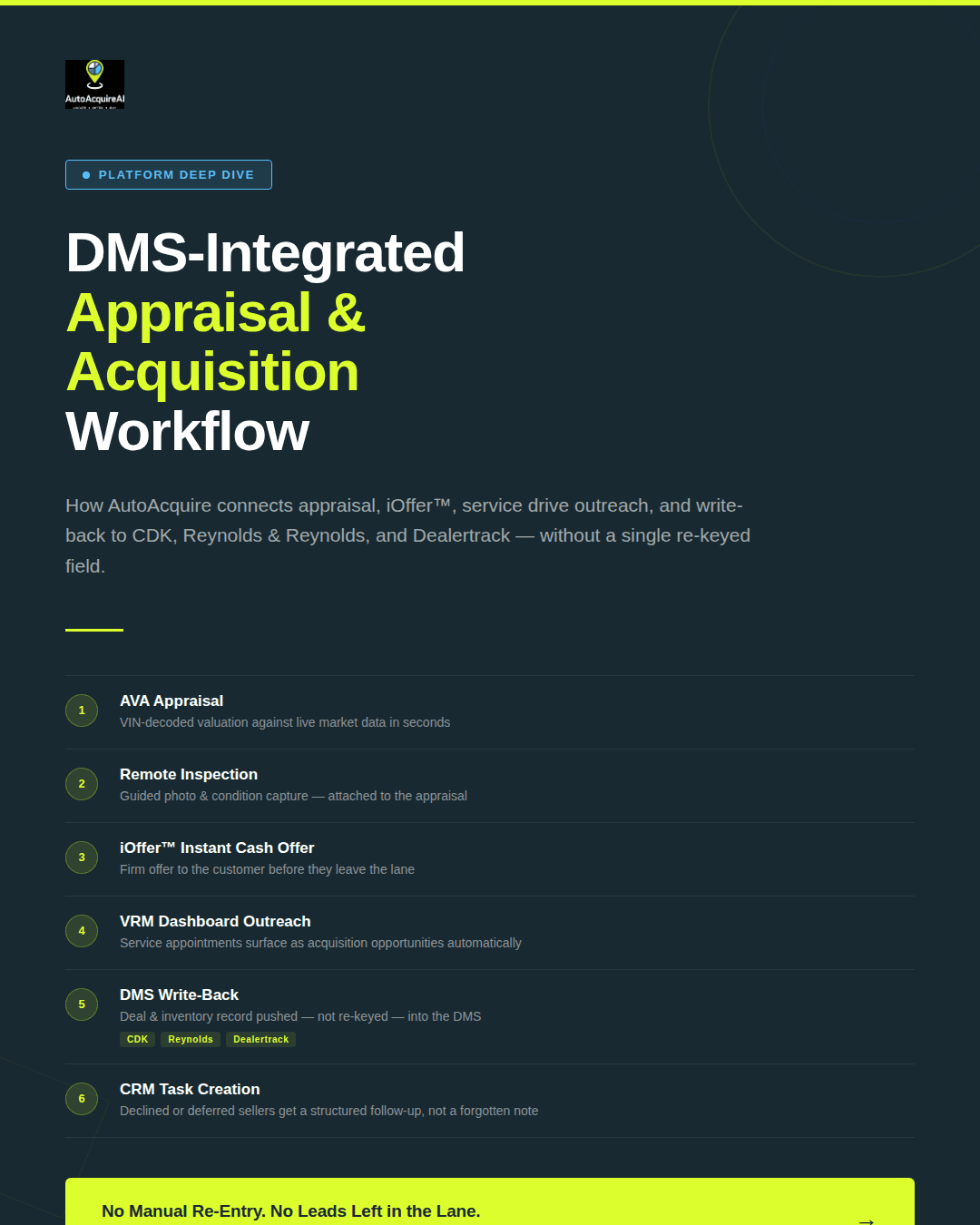
AutoAcquire treats the DMS as a sourcing engine rather than a system of record. Each stage in the workflow pulls and pushes data through the DMS, so an appraisal that starts at the service drive ends as a structured acquisition record without a single re-keyed field. The sequence below is what a used car manager runs in practice, start to finish.
Step 1: AVA appraisal
AVA, AutoAcquire's appraisal engine, identifies the vehicle by VIN and builds a valuation against live market data. The manager gets a defensible number in seconds, and the appraisal record carries through every downstream step. No reappraisal happens later because the original AVA output stays attached to the deal.
Step 2: Remote Inspection
Remote Inspection captures condition data through guided photo and damage capture, either by a customer on their phone or a service advisor at the lane. The condition report attaches to the AVA appraisal, so the valuation reflects actual reconditioning exposure rather than a blind market estimate. Ravin AI and UVeye fit dealers who need standalone inspection accuracy, but neither carries the inspection straight into an instant offer the way AutoAcquire does.
Step 3: iOffer instant cash offer
iOffer converts the appraisal and inspection into a firm cash offer the customer can act on immediately. The number reflects the condition data already captured, which keeps the offer honest and reduces the renegotiation that kills service-lane deals. A customer at the drive sees a real figure before they leave, not a callback promise.
Step 4: Service drive outreach via VRM Dashboard
The VRM Dashboard surfaces every service appointment as an acquisition opportunity. A manager sees which vehicles in the lane are worth pursuing, generates an offer through iOffer, and sends outreach without waiting for the customer to ask about selling. Dealers cutting auction dependence run most of their volume through this step, because the inventory comes directly from owners who already trust the store.
Step 5: DMS write-back to CDK, Reynolds, and Dealertrack
Once a customer accepts, AutoAcquire writes the completed deal back into CDK Global, Reynolds & Reynolds, or Dealertrack. The appraisal value, offer amount, VIN, and acquisition source land in the DMS as a live inventory record. AutoAcquire uses write-back here, not read-only sync. The vehicle enters the dealer's system ready for reconditioning and frontline pricing, with no second data-entry pass.
Step 6: CRM task creation
When a customer declines or defers, AutoAcquire creates a follow-up task in the CRM instead of letting the lead die in the lane. The acquisition record triggers the next touch automatically, so a deferred seller gets a structured callback rather than a forgotten note. Acquisition-native CRM triggers separate AutoAcquire from appraisal tools that stop once the number is generated.
Multi-rooftop centralization
For dealer groups, AutoAcquire runs all six steps across stores from one workspace while writing each deal back to that rooftop's own DMS instance. A used vehicle director sets appraisal floors and acquisition standards at the group level, and individual managers execute deals inside those guardrails. Group reporting rolls up acquisition volume, source mix, and gross by rooftop, so the director can see which stores convert service-lane traffic and which leave it on the table.
The auction-alternative payoff runs through the whole chain. A vehicle sourced from a service customer carries no transport cost, no buy fee, and a known service history. A lane purchase rarely offers any of that. Dealers who want to reduce auction reliance use the AVA-to-iOffer-to-write-back loop to keep acquisition gross inside the store. AutoAcquire does not replace the DMS or the inventory management system. It sits in front of them as the acquisition layer that feeds clean, sourced inventory into the systems dealers already run.
Best for: Franchised and independent dealers who want to source used inventory directly from service drive customers and private sellers, with every appraisal, offer, and deal writing back to CDK, Reynolds, or Dealertrack automatically.
AccuTrade: Appraisal-First DMS Integration
AccuTrade focuses on appraisal consistency. Built by Cars Commerce, it pairs VIN-specific condition data with a guaranteed cash offer that holds for a set window, which gives dealers a number they can stand behind at the desk. For stores that struggle with appraisal variance between managers, that consistency solves a real problem.
The DMS connection runs deep. AccuTrade ties into the major platforms and pulls vehicle and customer records so appraisers work from accurate data instead of re-keying VINs. Cox distribution puts the tool in front of a large dealer base, and the guaranteed-offer model gives sales staff a reason to walk an appraisal toward a trade-in or buy decision.
AccuTrade is built around the appraisal event, not the sourcing motion. The platform produces a defensible number for a vehicle already in front of the appraiser. That scope works well for stores whose acquisition process starts when a customer walks in.
Where AccuTrade focuses on appraisal accuracy, it does not include the proactive service drive outreach AutoAcquire runs through the VRM Dashboard. A customer with a clean off-lease vehicle scheduled for an oil change does not automatically enter an acquisition pipeline. A manager has to spot the opportunity manually. For dealers trying to source more inventory from their own service lane, that gap requires a separate process or tool.
AccuTrade's appraisal model is also in-person by design. AutoAcquire's Remote Inspection and iOffer combination supports appraisals on vehicles the dealer has not yet seen, which extends reach to private-party sellers before they visit the store. On the CRM side, AccuTrade's workflow centers on the appraisal hand-off rather than generating follow-up tasks tied to acquisition outcomes.
Best for: Dealers who need appraisal consistency and a guaranteed-offer model, and whose sourcing process starts when a customer walks in the door.
AutoAcquire vs. AccuTrade: Head-to-Head Comparison
The table below maps the features that matter most to dealer principals evaluating both platforms.
| Feature | AutoAcquire | AccuTrade |
|---|---|---|
| DMS write-back (CDK / Reynolds / Dealertrack) | Yes, real-time across all three | Yes, strong native ties |
| Instant cash offer (iOffer) | Yes, built into the workflow | Guaranteed-offer model, appraisal-led |
| Remote Inspection | Yes, paired with iOffer | Not included |
| Service drive outreach | Yes, automated via VRM Dashboard | Not included |
| CRM workflow triggers | Yes, acquisition-native task creation | Limited to appraisal hand-off |
| Multi-rooftop support | Yes, centralized with per-store write-back | Yes |
| Auction-alternative sourcing | Yes, direct-to-consumer from service drive and private sellers | No, appraisal valuation only |
| Pricing model | Subscription, acquisition-focused | Per-rooftop appraisal subscription |
Dealers who only need a defensible trade number will find AccuTrade does that job well. Its guaranteed offer and DMS depth suit a desk that wants appraisal discipline without changing how cars get sourced.
Best for: Dealer groups and high-volume stores that want appraisal, instant cash offer, service drive outreach, and DMS write-back running as one connected workflow — with no manual re-entry between steps.
DMS Platform Integration Details
CDK Global
AutoAcquire connects to CDK Global through its API integration layer, which supports real-time write-back. Once a deal closes, AutoAcquire pushes the appraised vehicle record, VIN, condition data, and acquisition source into the CDK inventory and deal jacket. IT leads should expect a rooftop-level permission request during setup, since CDK scopes API credentials per store rather than per group.
Reynolds & Reynolds
Reynolds & Reynolds requires its certified integration program for any third-party write access, so AutoAcquire connects through that approved channel. Write-back covers vehicle identification, appraisal value, and the inbound acquisition flag used for stocking reports. Sync runs in near real time for most fields, though some inventory updates batch on Reynolds' processing schedule. Plan for a longer certification window than CDK, and confirm which user account holds the write credential before go-live.
Dealertrack
Dealertrack supports both read access and write-back, and AutoAcquire uses the write path to update the inventory record and create the acquisition entry. Real-time sync applies to appraisal and offer data, while document and title fields follow Dealertrack's batch cadence. Multi-rooftop groups running Dealertrack across stores need each rooftop authorized separately, which keeps store-level data segmented for group reporting.
Setup Considerations Across All Three
Each DMS scopes permissions at the rooftop level, so a dealer group adding a new store repeats the credential step rather than inheriting group access. Real-time sync applies to appraisal value, VIN, and offer status across all three platforms. Title, document, and certain inventory fields batch on the DMS provider's schedule, not AutoAcquire's. The used car manager should map which fields the store team relies on for live decisions, then confirm those fields fall under real-time write-back before the first appraisal runs through the system.
Service Drive Outreach Workflow
The VRM Dashboard converts a service lane that already runs every day into an acquisition pipeline. Most appraisal tools wait for a customer to request a quote. The VRM Dashboard moves first, flagging vehicles worth pursuing before the customer walks back to the waiting room.
Here is the sequence a dealer can run during the first week after integration.
Trigger to offer in six steps
- A scheduled service appointment lands in the VRM Dashboard, pulled directly from the DMS appointment feed.
- AVA pre-populates the appraisal using DMS records, so mileage, VIN, and service history fill in without a manager keying anything.
- iOffer generates an instant cash offer against current market data the moment the appraisal completes.
- Outreach goes to the customer by text or email, timed to the appointment, with the offer attached.
- The customer responds. An accepted offer routes straight into the deal flow.
- A non-response or a maybe creates a CRM follow-up task assigned to the right manager, so no lead sits idle.
Because the offer exists before the customer asks, the highest-value trade-ins in the service drive get appraised before they leave the lot.
Running the sequence against scheduled appointments also gives used car managers a forecast. They see which vehicles arrive tomorrow and can prioritize outreach on the units they actually want, rather than reacting to whoever happens to ask.
Multi-Rooftop Operations
A dealer group running six stores needs one acquisition standard, not six. AutoAcquire lets a used vehicle director set appraisal floors, condition deductions, and offer rules at the group level, then push those rules down to every rooftop. Individual store managers execute deals inside the same rules without rebuilding their own logic.
DMS write-back stays segmented by rooftop. When a manager at Store 3 closes a private-party acquisition, the vehicle record writes back to that store's DMS instance under its own franchise and stock numbering. CDK, Reynolds, and Dealertrack each handle multi-store accounts differently, so AutoAcquire maps write-back to the correct store ID rather than dumping every deal into one shared record.
Reporting rolls up the other direction. The director sees group-level acquisition volume, average cost-to-market by store, service drive conversion rates, and which rooftops lean hardest on auction lanes. That last number tells a group where direct sourcing is working and where a manager still defaults to the block.
Permissions separate strategy from execution. The director controls floors, offer parameters, and which channels each store can run. Store managers send iOffers, run Remote Inspections, and clear CRM tasks inside those limits. A manager cannot raise the offer ceiling past what the director set, so margin discipline holds across every store without the director approving each deal by hand.
Buyer's Guide: Choosing the Right DMS-Integrated Appraisal Setup
Three questions narrow the field before any vendor call.
First, define the sourcing goal. Dealers who only need consistent appraisal numbers and a guaranteed offer model should look at AccuTrade. Dealers who want appraisal plus active sourcing from service drive customers and private sellers need the full acquisition workflow AutoAcquire runs through AVA, iOffer, and the VRM Dashboard.
Next, decide whether DMS write-back is required. Read-only sync forces managers to re-key appraisal data into the DMS, which breaks the workflow at the worst moment. Dealers running CDK, Reynolds, or Dealertrack who want appraisal records and CRM tasks created automatically should confirm true write-back, not a one-direction feed.
Finally, weigh single store against multi-rooftop. A single store can run either platform without group reporting overhead. Dealer groups that want centralized appraisal floors set by a used vehicle director, per-rooftop write-back, and group-level acquisition reporting fit AutoAcquire's multi-rooftop structure.
A single-rooftop dealer focused purely on appraisal consistency lands on AccuTrade. A group sourcing directly from the service drive with DMS write-back lands on AutoAcquire.
FAQs
Does AutoAcquire replace my DMS?
No. AutoAcquire runs as an acquisition layer on top of the DMS. It writes appraisal and acquisition records back into CDK, Reynolds, or Dealertrack rather than replacing the system of record.
What DMS platforms does AutoAcquire integrate with?
AutoAcquire connects with CDK Global, Reynolds & Reynolds, and Dealertrack. Each connection supports write-back of appraisal and deal data, so service drive and private-party acquisitions appear in the DMS without manual re-entry.
What is DMS write-back and why does it matter?
Write-back pushes data from the appraisal tool into the DMS, instead of only reading from it. In AutoAcquire, write-back sends each appraisal, offer, and deal status into CDK, Reynolds, or Dealertrack automatically. That keeps the DMS current the moment a deal moves and spares managers from re-keying records.
How does iOffer work at the service drive?
iOffer generates an instant cash offer for a vehicle already scheduled for service. In AutoAcquire, the VRM Dashboard pulls the customer record from the DMS and AVA prices the trade. The offer reaches the customer before they leave the lane, turning a routine service visit into an acquisition.
Can AccuTrade and AutoAcquire run side by side?
Yes. Dealers that already rely on AccuTrade for appraisal consistency can add AutoAcquire for service drive outreach, Remote Inspection, and acquisition-native CRM triggers. The two cover different jobs and write to the same DMS.
How long does integration setup take?
Single-rooftop integrations typically complete quickly once DMS credentials and rooftop permissions are confirmed — timelines vary by DMS platform and store configuration. Multi-rooftop groups take longer because each store requires its own write-back mapping and permission structure.
Is multi-rooftop support included or an add-on?
Multi-rooftop support is part of the platform for dealer groups. A used vehicle director sets group-level appraisal floors and reporting, while store managers execute deals against per-rooftop DMS write-back.